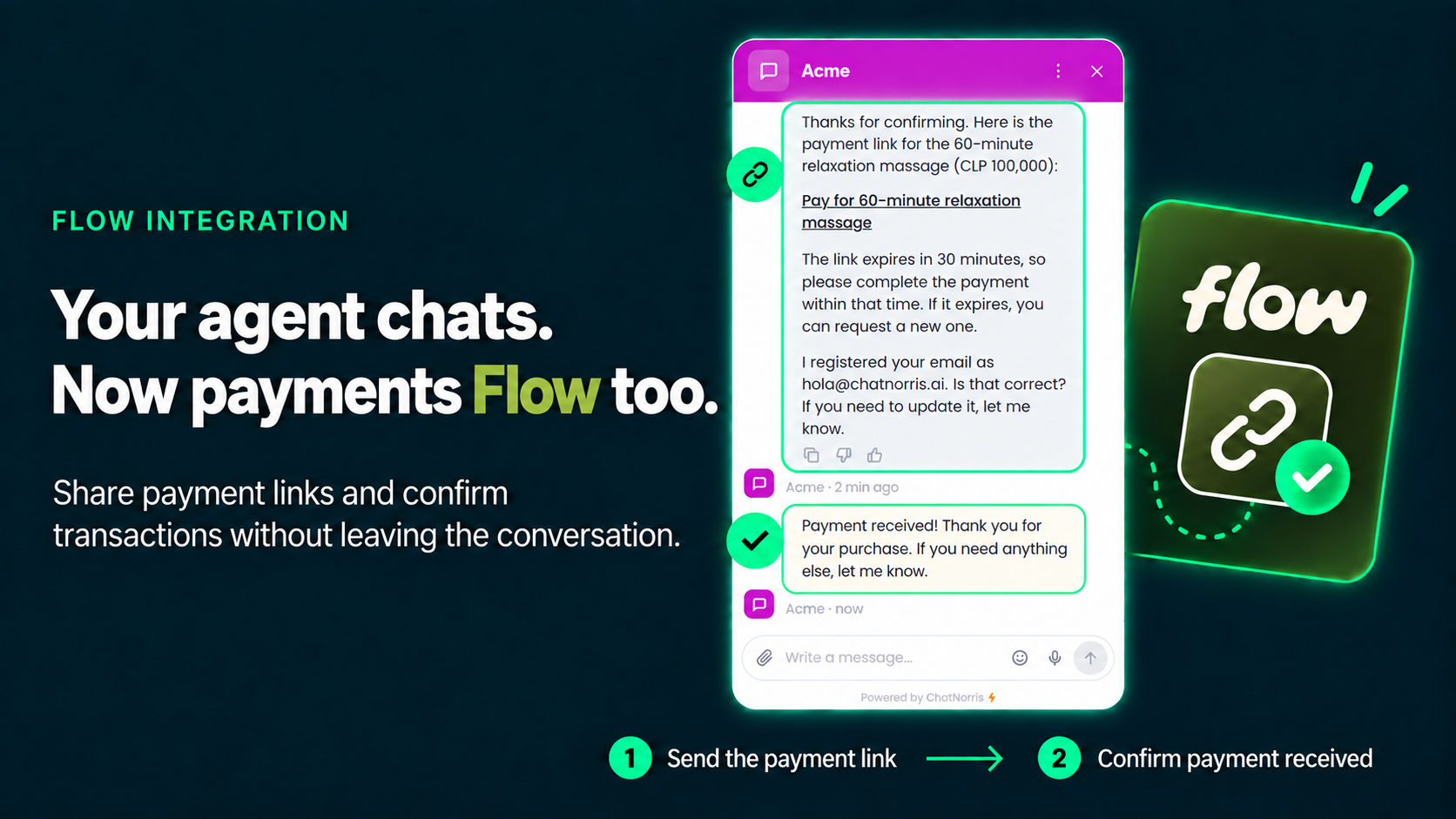
Your ChatNorris agent could already charge inside the chat with SumUp and with Mercado Pago across Latin America. Today we're adding a third provider to the Payment action, built for Chile: Flow. With Flow, your customers pay with the methods they already use every day: Webpay (credit, debit and prepaid cards), Khipu (bank transfer) and the other methods enabled in your Flow account.
The usual clarification, because it's what we get asked most: Flow handles the payment from start to finish. ChatNorris takes no part in any step of the charge: it doesn't process the card, never sees that data, and the money goes straight to your business's Flow account, never to ours.
The payment methods your Chilean customers already know
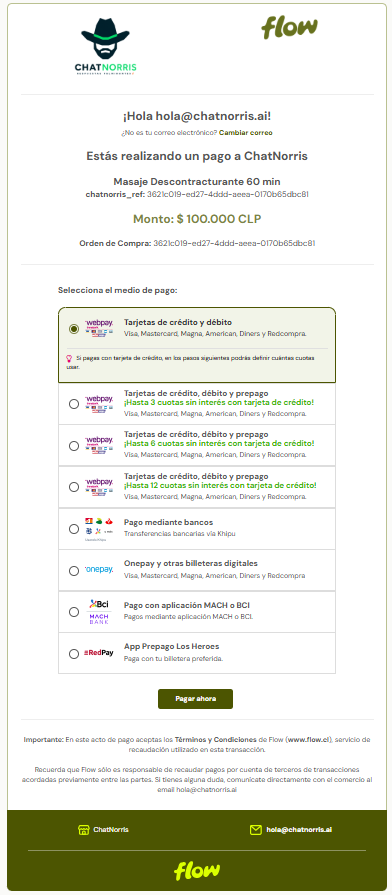
In Chile, "can I pay with Webpay?" or "do you take bank transfers?" decides a lot of sales. Flow brings those methods together on a single payment page: your customer chooses whether to pay by card through Webpay, by transfer through Khipu, or with another method enabled in your account, without you connecting each one separately.
For ChatNorris it's a single connection: you paste your Flow API Key and Secret Key once, in your agent's Integrations hub. Which methods your customer sees is up to your Flow account.
From "how much is it?" to "it's paid", in the same conversation
The sale you lose most often is the one that was already decided: the customer asks the price, says "yes, I want it", and someone on your team has to create a separate link, send it through another channel, and wait.
With the Payment action that step disappears. You set up a catalog of products or services (name and price in Chilean pesos) from the dashboard, and when the visitor confirms the purchase, the agent generates the payment link right there: in the web widget, on WhatsApp, on Instagram, or on any channel where the conversation is happening.
How it works, step by step
- The visitor asks about a product or service. The agent answers with the price from your catalog. It never makes up or calculates an amount, and if another source says something different, the catalog wins.
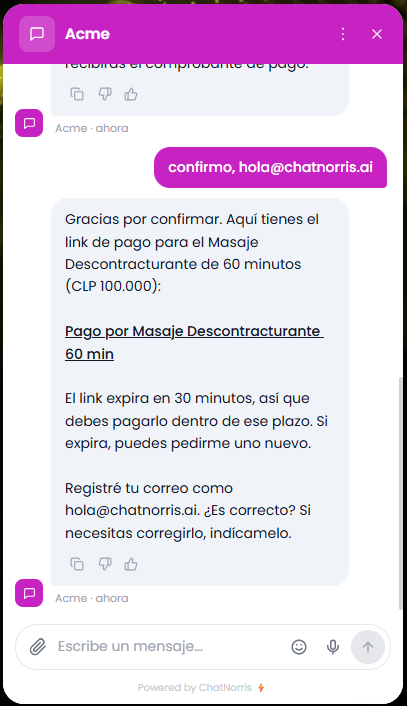
- The agent asks for an explicit confirmation and the customer's email. Flow sends the receipt to that email, so the agent asks for it in the same conversation. The customer can confirm and share their email in a single message.
- The agent delivers the Flow payment link. The link expires in 30 minutes; if it does, the customer can ask for a new one.
- The customer pays on Flow's page with Webpay, Khipu or whichever method they prefer, entirely outside ChatNorris.
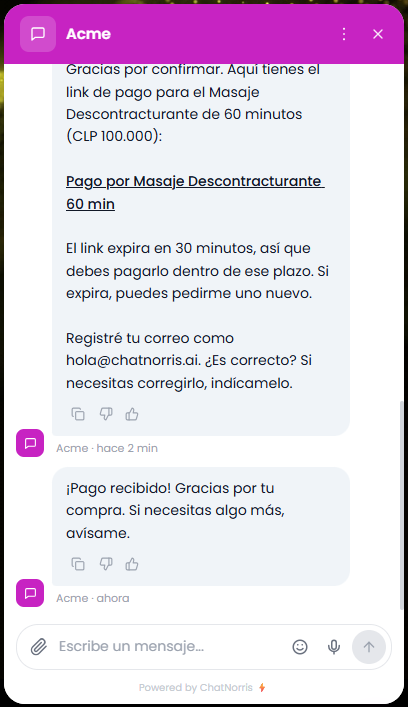
- The agent confirms the payment in the same conversation as soon as Flow reports the charge is complete. Nobody has to ask "has the payment come through?".
Why Flow handles the payment, not ChatNorris
It's the same design decision we made with SumUp and Mercado Pago. The link your agent delivers opens Flow's payment page, on Flow's domain, and all handling of sensitive data happens there.
Concretely:
- ChatNorris never sees or stores a card number, a bank password or any payment data. For each charge we only keep its status (pending, paid, rejected) and the amount.
- The money goes straight to your Flow account, not to ChatNorris. We only generate the link.
- Payment security and compliance are handled by Flow, together with the methods it integrates, such as Webpay and Khipu.
- The payment status is always checked with Flow using your credentials. ChatNorris doesn't mark a charge as paid just because a notification arrived: it confirms with Flow before telling your customer.
What you need to turn it on
- An active Flow account for your business in Chile. If you don't have one yet, you can create it at flow.cl.
- Your Flow API Key and Secret Key, which you paste once in your agent's Integrations hub. ChatNorris validates them against Flow when you save them and detects whether they're test (sandbox) or production keys.
- A catalog of items in Chilean pesos (CLP), from the Payment action. Flow doesn't accept charges below 350 CLP.
Available on the Standard and Premium plans
Just like SumUp and Mercado Pago, the Payment action with Flow is available from the Standard plan. You can see the full details on our pricing page.
Connect your Flow account, set up your catalog and deliver payment links in the same conversation, in minutes.
Start for freeIn short
Your ChatNorris agent could already answer questions, look up orders and charge with SumUp and Mercado Pago. Now it also charges with Flow: your customers in Chile pay with Webpay, Khipu and the other methods in your account, and the agent confirms the payment in the same conversation. You can see the rest of our integrations or start for free to set it up on your agent.